Saturday, March 15, 2008

Boing Boing's Guide to Defeating Censorware

来源:boingboing.net

(see story here)

"The Internet interprets censorship as damage
and routes around it." -- John Gilmore

If your employer or corrupt, undemocratic, dictator-based government uses a filtering service such as Secure Computing's SmartFilter to block access to BoingBoing.net -- or anything else online -- you can try the following workarounds:

  • Distributed BoingBoing mirrors everything on BoingBoing.net at random IP addresses to foil filters.

  • Read "Technical Ways to Get Around Censorship," a helpful primer from Reporters Without Borders: Link.

  • Google can act as a lightweight, proxy-like tool for accessing forbidden sites -- but don't rely on this method for anonymity. Link.
  • The popular RSS reader Bloglines can offer lightweight help in some cases, too. Boing Boing reader Tom says, "I work for a BIG financial services company that apparently uses (not-so-) SmartFilter because BoingBoing has recently become a forbidden site. I use Bloglines as my RSS reader so that I can access the blogs I read from work and home. It turns out that Bloglines is acting as sort of a proxy, since it connects to your RSS feed and not my computer, I'm still able to read BoingBoing at work. Since you publish the full text of your entries in your feeds I'm not missing much, though any photos linked directly from your site are edited out."

  • A group called Peacefire created proxy software called Circumventor to bypass censorware. Install this software on your home computer and allow others to use your proxy to access the web, or use your proxy from work or school to access any web site. (Thanks, Sean!)

  • Bennett Haselton of Peacefire, who developed Circumventor, says:

    "For 90% of users in the USA affected by SmartFilter, there is no reason to use anything but Circumventor. The reasons are:

    1) It's simple to set up. Just run three simple point-and-click installers. We even have a wizard that comes up automatically to help you set up port forwarding on your router if you've never done it before.
    2) You are not required to install anything on the "censored" computer, you just bring a URL in with you to work.
    3) It works even if the censored network blocks direct connections to IP addresses outside the network (which would break some of the other solutions recommended in this guide).

    "If you're in Iran, Saudi Arabia, or some other country censored by SmartFilter, then your best choices are (a) TOR, or (b) use a Circumventor if you can get someone in a "free country" to set one up for you. (The reason Circumventor works for 90% of workplace-filtered users in the U.S. is that they can almost always set it up on their home computer and take the URL in with them. But not everybody in a censored *country* has someone outside who can help them.)

    "Circumventor is the *only* method (as far as I know) that will work reliably on computers where people are blocked from installing their own software (or even changing proxy settings) -- because after you install it on your home computer, all it gives you is a URL, and you can take that URL in with you to work and use it whenever you want. Many people in workplaces and libraries are blocked from installing software on their computers. Or even if they could, it would be a definite 'smoking gun' if anyone noticed that the software had been installed; whereas our software leaves fewer traces. (There is a 'smoking gun' in the form of a URL in the URL history, but that's much less likely to be noticed than a TOR icon on your desktop!)"

  • Rich says, "This cgi-bin script is the guts inside Peacefire's Circumventor - a Perl CGI script that proxys for you. While Circumventor is a full script to get it working under Win2k/XP, the cgiproxy script alone lets you get it going on Linux and (presumeably) Mac OSX. And the best part - the setup is dirt simple - if you're already running a web server, pretty much just drop it in your cgi-bin directory.
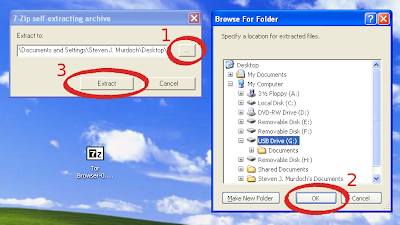
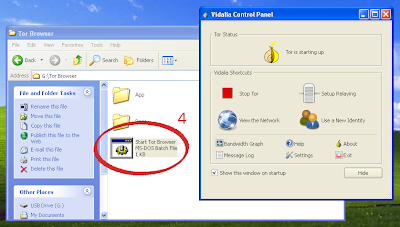
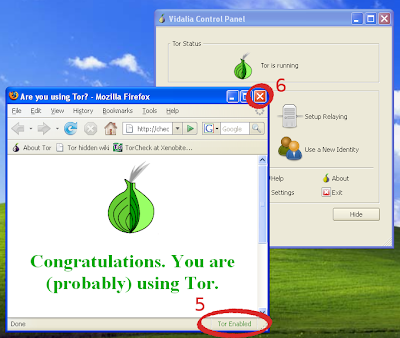
  • Access the TOR network. The more people who run Tor servers, the faster and more anonymous the network becomes.

  • Using an SSH tunnel, VPN, or anonymous overlay to an unfiltered network is widely considered to be the best way to protect yourself while accessing "prohibited" content. (Thanks, chris)

  • Chris says, "There is a new option in OpenSSH that allows for ethernet level tunneling using the kernel's TUN interface. This is probably the most powerful solution if you have access to a friendly system to use as the end point of the tunnel. Manual for ssh, see -w option: Link. For ssh_config, see Tunnel option: Link. And one more way to use SSH as a tunnel is to with SOCKS: Link. osx example script: Link.
  • Breaking out of a Proxy Jail. Link (Thanks, Mutz!)

  • Try Daveproxy, and other services listed on the proxy list at samair.ru/proxy together with AntiFirewall (a small app that tests proxies). (Thanks, Joao Barata!)

  • Try Java Anonymous Proxy. JAP uses the TOR network, and installation is pretty easy for non-nerds. (Thanks, Jonas)

  • The Bitty browser, while not initially designed as an anonymizing tool, has helped some of our readers work around corporate internet filters. (Thanks, Scott Matthews!)

  • Some of our readers have found the Coral Content Distribution Network (CCDN) helpful for evading internet blocks. Just add ".nyud.net:8090" at the end of boingboing.net -- for example, instead of typing http://www.boingboing.net to your browser's address line, instead type http://www.boingboing.net.nyud.net:8090. If port 8090 is blocked for some reason, the Coral Cache also functions on port 8080. Or, try adding .cob-web.org:8888 to the URL if the Coral Cache is blocked, for an alternate cache network. (Thanks, BeHE, Tian and Michael!)

  • Check out the regularly updated list of public proxy servers at publicproxyservers.com.

  • For BoingBoing readers in the UAE or Qatar, or other countries where BoingBoing is blocked, one anonymous reader tells us: "There is an internet via satellite called OPENSKY sold through www.broadsat.com which goes around these problems. Using VPN with normal dialup, the signal gets sent back from Europe, so, uncensored. Works really well and is cheap!"

  • Andy Armstrong says, "I've also set up a proxy for boingboing at boingboing.hexten.net."

  • Ben says, "You can also set your home computer up for remote access. Windows XP has the components built in. If you run XP at home it will take you about 30 min to set up. You can find instructions here. Once you set up remote access you can use Zone Edit freeware to set up a static IP, even if you are on a cable modem. If you really want to go all out register a website for $5 and have that point to the Zone Edit IP address. I can hit my home computer from anywhere with web access, and have its full functionality, including censor-free web browsing."

  • Marcus Aurelius says, "This is how I dodged Etisalat's (The UAE ISP and telco) proxy-server blacklist. It is only really useful for text-rich sites since it involves using Lynx a text browser."

  • Abdul Aziz says, "It's a pain to know that countries and companies alike are blocking and censoring sites like Boing Boing. I face this at my office everyday. I've mentioned two ways on my site by which you can bypass these proxies and filters safely and securely without breaking any rules or arousing the network admin's suspicions." Link

  • Former Censorware Project chief programmer Seth Finkelstein posts anti-censorware resources here .

  • A tutorial on how to bypass Internet Censorship using proxies, shells, JAP, and the like: Link (Thanks, Seth Finkelstein)

  • Michael sez:
    The Anonymizer company has a contract with the Voice of America to provide anonymous internet access for users in a number of foreign countries, including Iran and China. Here's how an Anonymizer sysadmin describes the Iranian portion of the service: "It's based off of PrivateSurfing [...]. Added features for the Iran proxy is full time SSL, URL encryption, Farsi language support, and we switch the proxy website about once a month (every time the Iranian government blocks us). We perform checks on the service from within Iran to see if our site is actually blocked (yes, it works), and we maintain a database of all known e-mail addresses that we can detect as being located in Iran. Every time we switch the proxy site we send an e-mail informing them of the new free proxy location so the citizens of Iran can find it. The sites are also broadcast via radio and TV into Iran by the VOA. To be honest, we're usually about a day behind the blocks, due mostly to time zone differences."

Or...

  • If you're accessing BoingBoing from work, you may be able to ask your system administrator to whitelist BoingBoing.net. That's shorthand for selectively removing the domain from a list of forbidden sites provided by the filtering software vendor. If your employer uses SmartFilter, for example, a sysadmin can selectively allow the BoingBoing.net domain, while keeping the rest of the entries for the "blocked" category in which BoingBoing is listed. Bribing your network administrator with cartons of Skittles and Red Bull may expedite this option. (Thanks, mcsey!)

If you know of any good ways to defeat censorware, please send us your suggestion.

Stop Australian Internet Censorship

来源:TakingITGlobal

Petition created by: Michael Meloni

Australian Senator, Stephen Conroy, is set to introduce mandatory Internet filtering in 2008. This petition has been organised to put an end to the filtering in Australia, before it begins!

Existing reports (some even conducted by the Australian Government) show that ISPs and customers will be forced to pay if mandatory filtering is introduced. The 2003 Ovum report on filtering commissioned by the Howard Government even finds that smaller ISPs will not be able to absorb the costs like large ISPs.

Furthermore, industry groups have all warned that the filtering can and will be bypassed. Why waste money on something that isn't going to work?

Show your support by signing this petition. Show Mr Conroy and Mr Rudd that Australia does not require a Government babysitter.

This petition will be forwarded to all politicians concerned.

15种网页截图工具

来源:Webeta*味贝

参加过一系列点名桌面秀活动后 我在想会不会有人发起个”你正在看的网页秀”

说不定会让人大开眼界 说到给网页截图

Mashable收集了三大类15种常用的工具 看看会不会对你有所帮助

浏览器插件/扩展类:

Save as image - 一个小巧的插件,可以让你轻松在Firefox中截取到网页,框架或是任何你想要的部分。

savesaimage

Pearl Crescent Page Saver -截图功能和Save as image相仿,可以把图片保存为jpg或png格式。它还可以自动把截图缩放到一个合适的尺寸。

Picnik for Firefox - 直接到截图传送到Picnik进行裁剪与编辑。之前在17个让blogging变得更轻松的Firefox扩展中也提到过它

Snissa - 一个小巧的截图插件,功能比较简单。

Screengrab! - 可以选择截取整个网页(包括屏幕没有显示出来的部分),目前可视网页或者连同Firefox窗口一并截取。甚至还能用鼠标框选截图范围。

ieSnapshotter - 唯一一个为IE截图准备的插件,可以生成截图或缩略图片。

软件类:

SnagIt - 对它没有什么多说的了,应该是截图业的霸主了吧。适合对截图有各种要求的变态级截图达人。 正式版需要39.95刀,购买前你可以先试试免费的试用版本。

FastStone Capture - 又是一款强大的截图工具。通过一个小巧的浮动控制面板完成捕捉活动窗口、活动对象、矩形区域、手绘区域、全屏幕、滚动窗口等任务。麻雀虽小,五脏俱全。

WebShot - 一个可以将网页或整个网站拍成照片或缩略图的工具。通过其强大的命令行工具可以自动对多个页面进行抓拍,调整图像大小等。

webshotapp

Paparazzi! - 一个Mac OS X上的小巧截图工具

PrintKey - 替代你键盘上的Print Screen SysRq键并赋予它更多的功能。如果不愿意为它付钱,你可以通过链接找到一个较老且没有技术支持的免费版本。

I4X Screencatcher - 为当前窗口截取图片,或者自己选择区域截取。

InstantShot - 一个MAC OS X下功能强大且免费的截图工具,提供包括抓取某个区域,热键,各种输出格式,图片缩放等诸多选项,你可以在menu bar找到它的身影。

基于网络类:

WebShotsPro - 你想要做的仅仅是输入你想要截图的网站地址。当然,在得到结果之前你可能会排上很长时间的队。毕竟很多人都对这个傻瓜式截图工具有爱。

Thumbalizr - 和上面的一样,仅仅输入地址就可以完成截图。但它会提供多种分辨率的截图供你选择。唯一的问题是,这网站经常抽风。Orz

创建网页截图的 N 种途径

转自:www.wangtam.com

网页截图是不少人日常所必须的,比如启羁,在介绍一些新网站和新应用的时候,免不了需要截图,作为直观描述的补充。创建网页截图的方式有不少,MA 也发了一篇相关的文章来收集,不过不是很全面,启羁在此基础上再补充一下,列出来,供大家参考和选用:

【浏览器插件】

Save as imagePearl Crescent Page SaverSnissaScreengrab! 都是 Firefox 上用于网页截图的扩展,不过对于部分网页内嵌代码并不感应,比如一些内嵌的媒体播放器、Flash 动画等等。

ieSnapshotter 则是应用于 IE 的截图插件,虽然方便,问题与 Firefox 的同类扩展一样,对于部分内嵌媒体无法截取。

Picnik for Firefox 是基于 Flash 的在线图形编辑工具 Picnik 的 Firefox 扩展,除了快捷发送网页中图片到 Picnik 进行处理和编辑之外,还能对于网页进行截图,然后发送到 Picnik。

Maxthon 的 2.0 版也增加了网页截图功能,直接整合在了浏览器中。

浏览器中应用的网页截图插件问题比较统一,就是截图中的内容有所不全(上面提到的网页内嵌媒体),作为一般使用应该够了,可以省下了安装本地软件的麻烦。

【屏幕截图软件】

SnagIt 是专业的截图软件,还自带一个图片编辑工具,就是体积比较大,还是收费软件;

FastStone Capture 5.3 版本之后,就收费了,不过原本 5.3 版本功能挺齐全的,而且官方也有 Portable 版本,完全绿色,启羁目前就在用这个,个人比较推荐;

HyperSnap-DX 也是老牌的 Windows 上的专业截图软件,启羁在用 FastStone Capture 之前就在用这个,不过一样体积不小,设定选项太复杂,虽然买了授权,不过最后还是弃用了 - 对了,这是一款收费软件;

WebShot 看名字就知道了,专门用于网页截图的,效果一般;

Paparazzi!InstantShot 都是 Mac OS X 下的屏幕截图软件;

I4X Screencatcher 是免费软件,功能应用很简单,同样免费的还有国产的 EPSnap,相对来说,在免费的中文同类软件里面做的算是最好的了。至于 WinSnap,虽然也可以免费使用,但是个人觉得功能比 FastStone Capture、EPSnap 略差,而且使用也不是很方便,包括快捷保存和个性化设定部分。

【在线工具】

WebShotsPro

Thumbalizr前几天 riku 介绍过

似乎不少人都忘记了一款已经改版的在线网页截图工具 BrowsrCamp,原本是作为在 Safari 浏览环境下测试网页的工具,不过可以变相作为 Safari 浏览器截图效果的工具,而且截图生成速度非常快。

8款Firefox网页截图/截屏扩展插件工具

转自:岩屋

Fireshot

Firefox截图/截屏扩展插件工具

一 款强大的Firefox截图/截屏插件,它不但能保存各种模式的区域,比如窗口和控件、全屏、活动窗口等等。还内置一个功能丰富的图片编辑器,可以对截图 进行缩放裁剪等操作,基本都完成所有需要截图处理功能。当然,强大的同时也就代表着体积相对其它的稍微要大一点,且对于普通用户来说,设置会有些繁琐。如 果你不需要那么多的功能,可以接着看现面向你推荐的其它Firefox截图/截屏类扩展插件工具。

Pearl Crescent Page Saver

Firefox网页截图/截屏扩展插件工具

这 是一个将网页保存为图像的Firefox扩展。图像可以保存为 PNG 格式,或者 JPEG 格式(需要 Firefox 2)。可以保存整个页面或者仅仅是可见部分。可以设置选项来保存全尺寸网页大小(默认)或者缩放到较小的尺寸。Page Saver 有两种版本:Basic 和 Pro,其中 Basic 是免费版本。

Snissa

Firefox网页截图/截屏扩展插件工具

这是FireFox插件的特别之处在于,它不仅提供网页截图,并且为你的截图提供免费的存储服务上传到他们的网站Snissa.com,并且不需要进行任何注册。可以保存为PNG或JPG格式的图片。

Piclens是FireFox上的一个插件,它可以让用户在浏 览网页的同时将网站上出现的图片以全屏方式展示,并提供幻灯片方式的浏览功能,效果非常的酷。目前支持FlickrFacebookGoogle Images, Yahoo Images,Friendster, Picasa Web Albums, Media RSS等图像网站。(via)

Firefox网页截图/截屏扩展插件工具

foxCamera 是一个将网页截取为图片的 Firefox 扩展。foxCamera 大小仅为 16 KB,可以截取网页的任何区域,并将其保存为 JPEG 图片格式。要是 foxCamera 能够提供截取整个网页的选项,将更加实用。

foxCamera 支持 x86 和 ppc32 的 Linux 系统,目前版本为 0.32,你可以从这里安装它。在重启 Firefox 后,右击 Firefox 工具栏可以加入 foxCamera 图标。当你需要截取网页时,点击该图标,直接拖动即会显示保存窗口。

Screengrab!是另一个Firefox截屏插件 ,可以让你截取网页屏幕,包括截取当前窗口或是滚动截取网页的全部内容。这将是非常方便的,尤其是对一个开发人员来说,有的时候,需要从全局的角度观看一个网页的设计来安排布局等等。

Picnik for Firefox 是基于 Flash 的在线图形编辑工具 Picnik 的 Firefox 扩展,除了快捷发送网页中图片到 Picnik 进行处理和编辑之外,还能对于网页进行截图,然后发送到 Picnik。(via wangtam)

Save as image是另外一款简单小巧的Firefox截屏插件。可以让你轻松在Firefox中截取到网页,框架或是任何你想要的部分。

被封,但依然要迈向自由

来源:http://andycaisccs.spaces.live.com/blog/cns!A0B73A59FA972CD9!446.entry

1. 去http://www.mozilla.org.cn/下载一个firefox。倒不是说ms的IE不能用,但是就firefox之好于IE,我就不多说了,仅从我dev的角度来看,起码IE整个unicode字体就支持的及其糟糕。

2. 去http://www.vidalia-project.net/download.php下载一个最新的vidalia,其实就是Tor 和 Privoxy 的合体,安装。

3. 配置Privoxy的config.txt,右键P图标edit -> Main Configuration,找到相应的地方,添加下面两行之一

forward-socks4a / 127.0.0.1:9050 . #这个除了上wiki,其余所有网站也要用proxy,所以会使类似google一样的访问也变得很慢

forward-socks4a *.wiki*.* 127.0.0.1:9050 . #只有访问wiki -@#$ pedia网站时才走proxy

这里也可以看到两个浏览器的好处,平常用IE正常快速的上网,碰上被禁的网站了,再开开firefox来浏览(这样可以用forward-socks4a / 127.0.0.1:9050 . 配置就好,因为不知道可能还要上什么网干什么坏事... ...)

4. 本来做完以上步骤就可以开始wiki -@#$ pedia之旅了,但是由于家里网络断断续续,开始几次都失败了返回503错误,我在config.txt中又找到forwarded-connect- retries项,并且修改为forwarded-connect-retries 5,这样privoxy就可以在网络不稳定的时候自动重新找代理刷新了。

5. 一切搞定,最后验证,打开firefox,看到右下角Tor,是开启的话,firefox会自动帮你配置LAN proxy,以实用privoxy。(用IE,需要手工配置LAN也可以访问wiki -@#$ pedia的)。如果不行的话,请察看LAN proxy的配置是否与下图相似。